
WeChat Pay Setup Guide for Foreigners
Complete step-by-step guide to set up and use WeChat Pay in China
⚠️ You May Need Help Activating
WeChat sometimes requires an EXISTING WeChat user to scan your QR code to activate your payment account. If this happens, ask your hotel staff, tour guide, or a friendly local — they do this all the time for foreign guests. This is a one-time step.
⚠️ Important Fee Note
Single transactions over ¥200 (about $28 USD) incur a 3% processing fee. Payments of ¥200 or less are usually fee-free. Consider splitting large purchases into smaller amounts.
Video Tutorial
Can't load? Open directly on YouTube (VPN required in China)
Download WeChat App
Get the official app from App Store or Google Play.

- ▸ Search "WeChat" in App Store or Google Play Store
- ▸ Download the official app by Tencent (green icon, 1B+ downloads)
- ▸ Open the app and tap "Sign Up"
- ▸ Register with your phone number — any country works
💡 Pro Tip: WeChat is more than payment — it's China's everything app. You'll use it for messaging, ride-hailing, and more.
Find & Activate WeChat Pay
WeChat Pay is hidden inside the app. Here's how to find it.
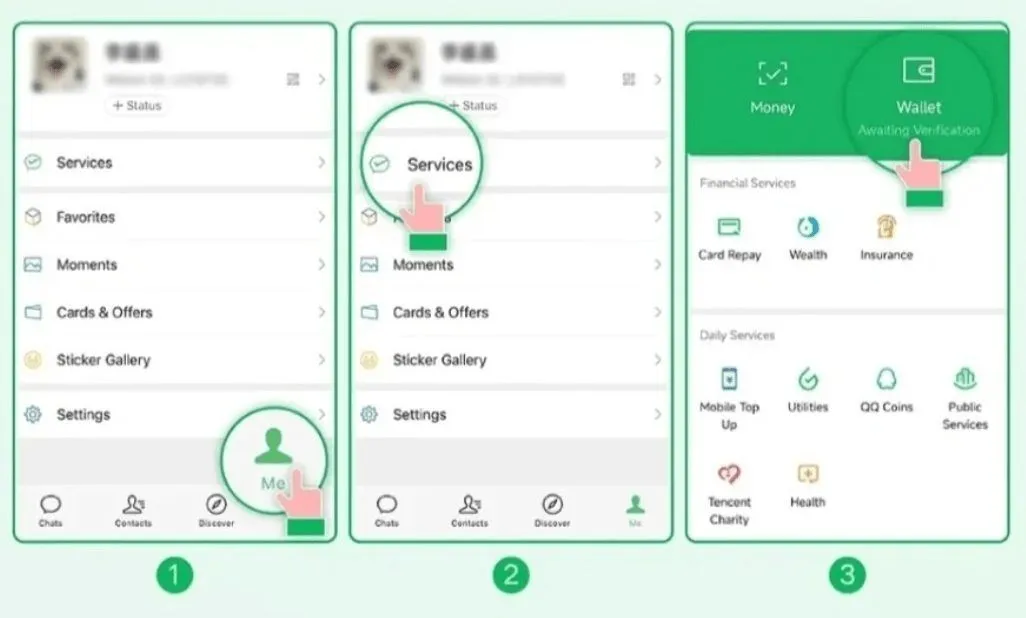
- ▸ Go to "Me" tab (bottom right) → "Services" → "Wallet"
- ▸ If you don't see "Wallet": Me → Settings → General → Tools → WeChat Pay → tap "Enable"
- ▸ You should now see Wallet with options for adding cards
💡 Pro Tip: If Wallet is still missing, try switching your phone language to English and restarting the app.
Add Your International Bank Card
Visa, Mastercard, JCB, Discover, Diners Club are all supported.
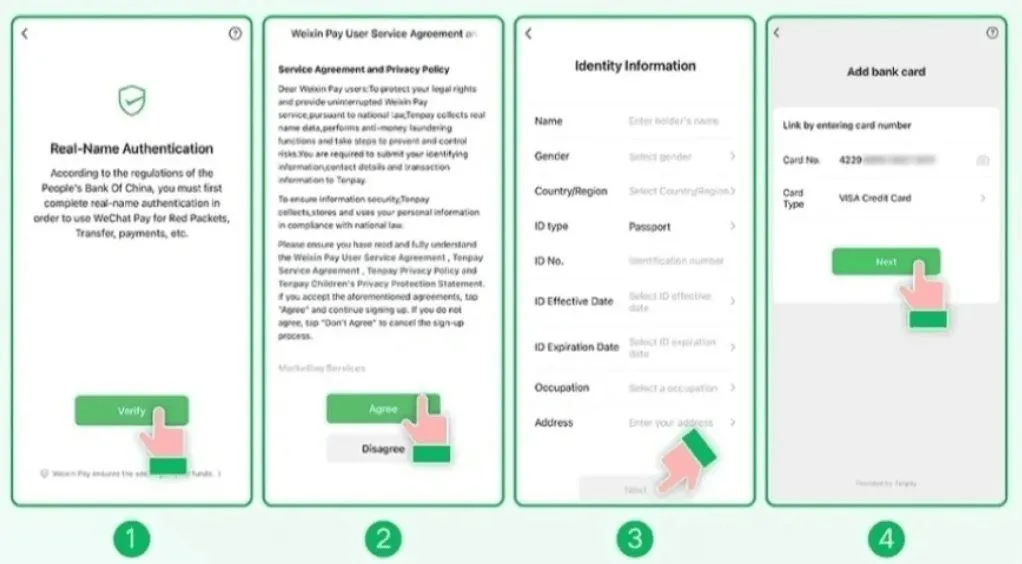
- ▸ In Wallet, tap "Add a Card"
- ▸ Read and agree to the WeChat Pay Service Agreement & Privacy Policy
- ▸ Select your card type (Visa / Mastercard / JCB / etc.)
- ▸ Enter your card number, expiry date, and CVV
- ▸ Confirm your billing address — must match bank records exactly
💡 Pro Tip: 💳 Supported: Visa, Mastercard, JCB, Discover, Diners Club. If one card fails, try another — some banks block China transactions by default.
Verify Your Identity (Passport Required)
Chinese law requires identity verification. You must upload your passport.
- ▸ After adding your card, you'll be prompted for identity verification
- ▸ Select "Passport" as your ID type
- ▸ Fill in your personal information as shown on your passport
- ▸ Upload a clear photo or scan of your passport information page
- ▸ Wait for verification — usually 1-5 minutes
💡 Pro Tip: ⚠️ Have your passport ready! The system will send a notification asking you to upload a copy. Without verification, your payment limit will be severely restricted.
Payment Method: Scan Merchant's QR Code
The most common way to pay — scan the code and confirm.
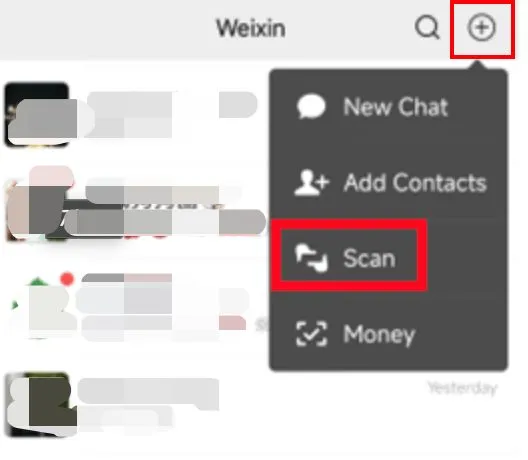
- ▸ Open WeChat → tap the "+" icon (top right) → "Scan"
- ▸ Point your camera at the merchant's QR code
- ▸ Enter the payment amount shown on the register
- ▸ Confirm with your payment password or fingerprint
💡 Pro Tip: Always double-check the amount before confirming. Most cashiers will show you the amount on their screen — make sure it matches.
Payment Method: Show Your Payment Code
Let the merchant scan you — works even with slow internet.
- ▸ WeChat → "+" icon → "Money" (or "Quick Pay")
- ▸ Your payment QR code appears — show it to the cashier
- ▸ The merchant scans your code — payment completes instantly
- ▸ No need to enter amount — the merchant's system handles it
💡 Pro Tip: This is your backup when your network is slow or when a shop doesn't support scan-to-pay. The code refreshes automatically for security.
🎉
🎉 WeChat Pay Ready!
✨ WeChat Pay + Alipay = covered everywhere in China. Set up both for peace of mind.
✨ Some small street vendors only accept WeChat Pay — Alipay won't work there.
✨ Keep your phone charged — no battery = no payment.
✨ For large purchases, split into sub-¥200 payments to avoid the 3% fee.
✨ If a payment fails, switch to the other method (Scan vs Show Code).
✨ The app works offline for receiving payments — useful in subways and rural areas.